Mark Food All Gone
Last updated
Food leaves the pantry in two ways: it gets eaten, or it gets tossed. Most apps only ask about the first, so waste hides inside "we ate it." All gone asks the honest question, and that's what makes your waste numbers worth reading.
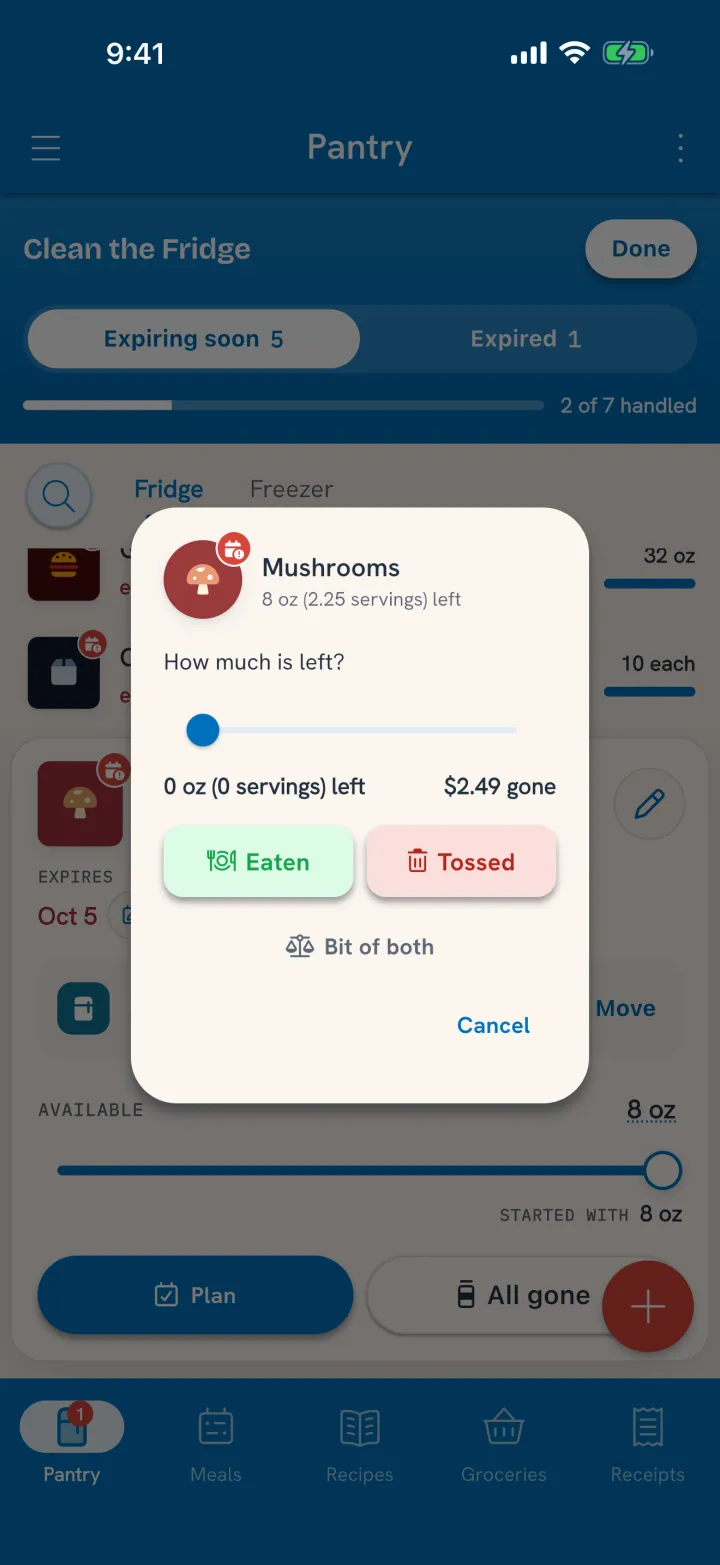
Mark it all gone
- Tap the item in the pantry to open its card.
- Tap All gone.
- Check How much is left? It starts at nothing. If there's a little left after all, slide it up.
- Say where the rest went: Eaten, Tossed, or Bit of both.
That choice is the save. There's no default, so waste never gets recorded as eating by accident.
Bit of both asks how much was tossed, so the split is what really happened, not a guess.
When to use it
- The yogurt cup someone ate straight from the fridge. Nobody logged it, but it's gone. All gone, Eaten.
- The spinach that went to mush in the bag. All gone, Tossed.
- Half the strawberries got eaten and the rest went soft. All gone, Bit of both.
- The container is empty and nobody remembers. That happens. Pick the closest answer and move on.
For food already past its date
On an expired item, Pitch is a faster way to say "this went bad." One tap records what's left as waste. See Clean the Fridge.
No scolding
Tuna doesn't keep score of your waste or send you guilt. The numbers are there for you: which foods keep going bad, and what they cost. Waste is rarely random. It's usually the same two or three optimistic purchases on repeat, and once you can see that, the fix is often buying one bag instead of two.
Related
- Acting before it gets this far: Use Food Before It Goes Bad.
- Working through everything at once: Clean the Fridge.