Set Up Everyone's Profiles
Last updated
A household shares one kitchen but not one body. Profiles are how Tuna keeps the food shared and the numbers individual: every member has their own goals, their own portions, and their own view of how it is going.
Adults
Invited members bring their own account and own their own setup:
- Their profile: body stats and activity level.
- Their goals: calorie needs, macro ranges, guardrails.
- Their numbers: what they eat lands in their own view, even when it came from the same pot as yours.
Kids
Kids get profiles without accounts:
- Open Household and choose Add Child.
- Give them a name and their basics.
- Set any guardrails that matter (a sodium ceiling, a protein floor). Kids get body stats and guardrails rather than adult calorie targets.
Now the six-year-old is a real person in the system: log dinner for the whole table and their plate counts toward their numbers, not yours.
Portions at the table
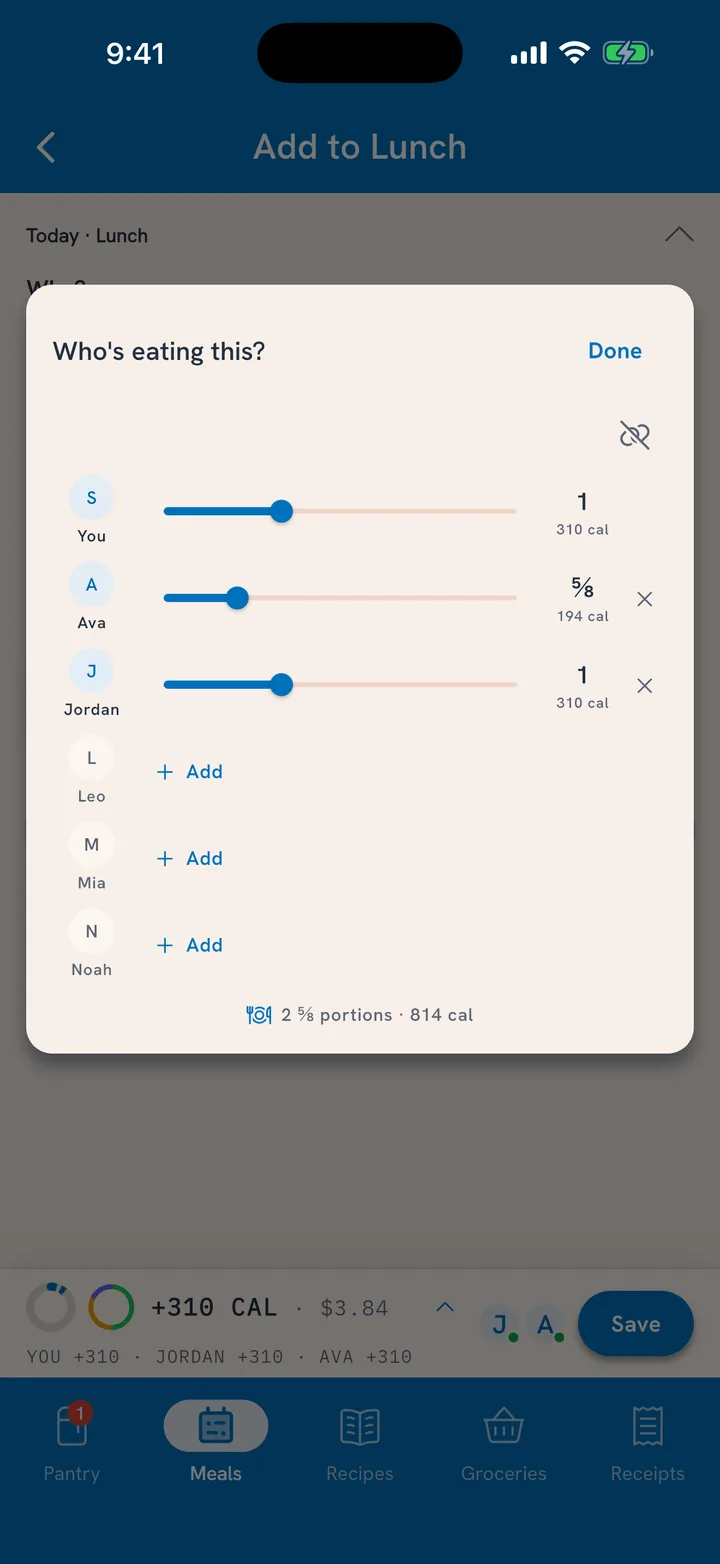
When a meal covers several people:
- Split it evenly with one tap, or drag portions per person: the toddler had a third of what dad had, and the record can say so.
- Tuna remembers who usually eats which meal, and nudges you when someone's dinner has not been logged.
Editing and leaving
Owners can edit or remove member and kid profiles from the Household screen; removing someone keeps the household's history intact. Members can leave and start their own kitchen anytime.
Related
- Sharing the pantry itself: Share One Pantry.
- Where each person's numbers live: See Your Nutrition Progress.