Chat With Your Pantry
Last updated
Chatting with your pantry means telling Tuna what changed in your kitchen in one plain sentence, spoken or typed, instead of tapping through screens. "We finished the milk, there's about half the lasagna left, and I tossed the spinach" becomes three changes to the pantry your household shares, and nothing is saved until you confirm them.
It works because Tuna already knows what's in your kitchen. When you say "the milk", it finds the milk you have, with its amount and date. When you say "two pounds of chicken breast", it finds chicken breast among over a million foods and gives it a date from how long chicken keeps in the fridge.
What you can say
Say it the way you'd tell someone else in the house. One sentence can carry several changes.
| You say | Tuna gets ready to |
|---|---|
| "Two pounds of chicken breast and a dozen eggs." | Add both to the pantry, each with its amount and an expiration date |
| "The leftover chili from Sunday." | Add the dish, and ask you to describe it so it has nutrition |
| "We finished the milk." | Mark the milk all gone, eaten |
| "I tossed the spinach." | Mark the spinach all gone, tossed |
| "There's about half the lasagna left." | Set the lasagna to half of what it was |
| "Actually we have two cartons of oat milk." | Raise the count to two cartons |
| "Put eggs on the list." | Add eggs to the grocery list |
| "The kids each had a cheese stick." | Log a snack for each of the kids |
| "I made the chicken bowls for four." | Cook the recipe and take its ingredients out of the pantry |
Where to chat with it
Pick the one that fits what you're doing:
- Loading your pantry, or putting away a shop with no receipt. Open Scan multiple items and tap Say what you have. Scan the things with barcodes and say the rest. See Say What You Have.
- Through the day, hands full. On the Meals tab, tap Talk to Tuna and say what happened: what someone ate, what you cooked, what went bad, what you bought. See Track Meals and Pantry Changes by Voice.
- From the AI chat app you already use. Connect Tuna once, then ask "What in the fridge needs eating this week?" or tell it what you bought. See Connect Tuna to Your AI Chat App.
Every one of them reads and writes the same pantry. A change you say on your phone is there when someone else in the house opens Tuna.
You confirm before anything changes
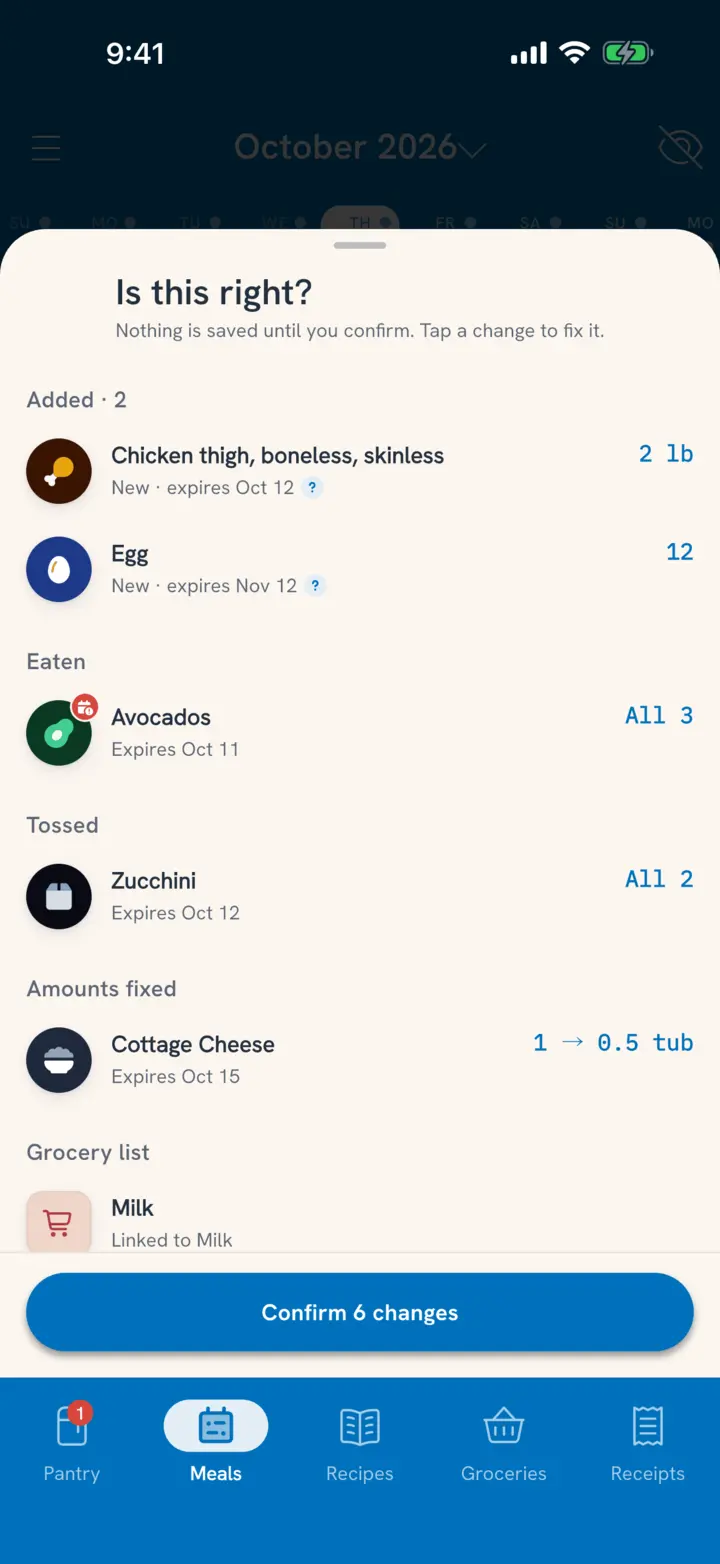
Tuna lays out what it heard on an Is this right? list, one row per change, before it saves anything:
- Read down the list. Each row names the food, the amount, and what will happen to it.
- Tap a row to change the food, the amount or the date.
- Swipe a row to Skip it. Put back brings it back.
- Tap Confirm 3 changes. They're saved the same way they would be if you had tapped them in yourself.
Meals and cooks you say wait in the Meals tab as plans until you confirm them there, the same as a meal you planned ahead.
Why the amounts hold up
A chat app on its own knows what you tell it. Tuna knows what happened: the receipt you scanned, the dinner you cooked, the yogurt that went bad. So when you ask how much rice is left, you get an amount, not a maybe, and when you say "half the lasagna is left", Tuna knows how much lasagna there was.
Related
- How do I load everything I already have? Load Your Pantry in One Go
- What happens when I mark something all gone? Mark Food All Gone
- How does cooking change the pantry? Cook a Recipe