Cook a Recipe
Last updated
Cooking is the one move that updates everything: ingredients leave the pantry, the dish gets nutrition and cost from what actually went in, and the finished dish goes back into the pantry with its own date. The cook screen reads like a sentence you can tap, and it puts the ingredients that still need a choice first.
Open the cook screen
- Open a recipe on the Recipes tab and tap Cook. You can also swipe a recipe row right to Cook, or start from Use It Up when you've planned an expiring item to cook.
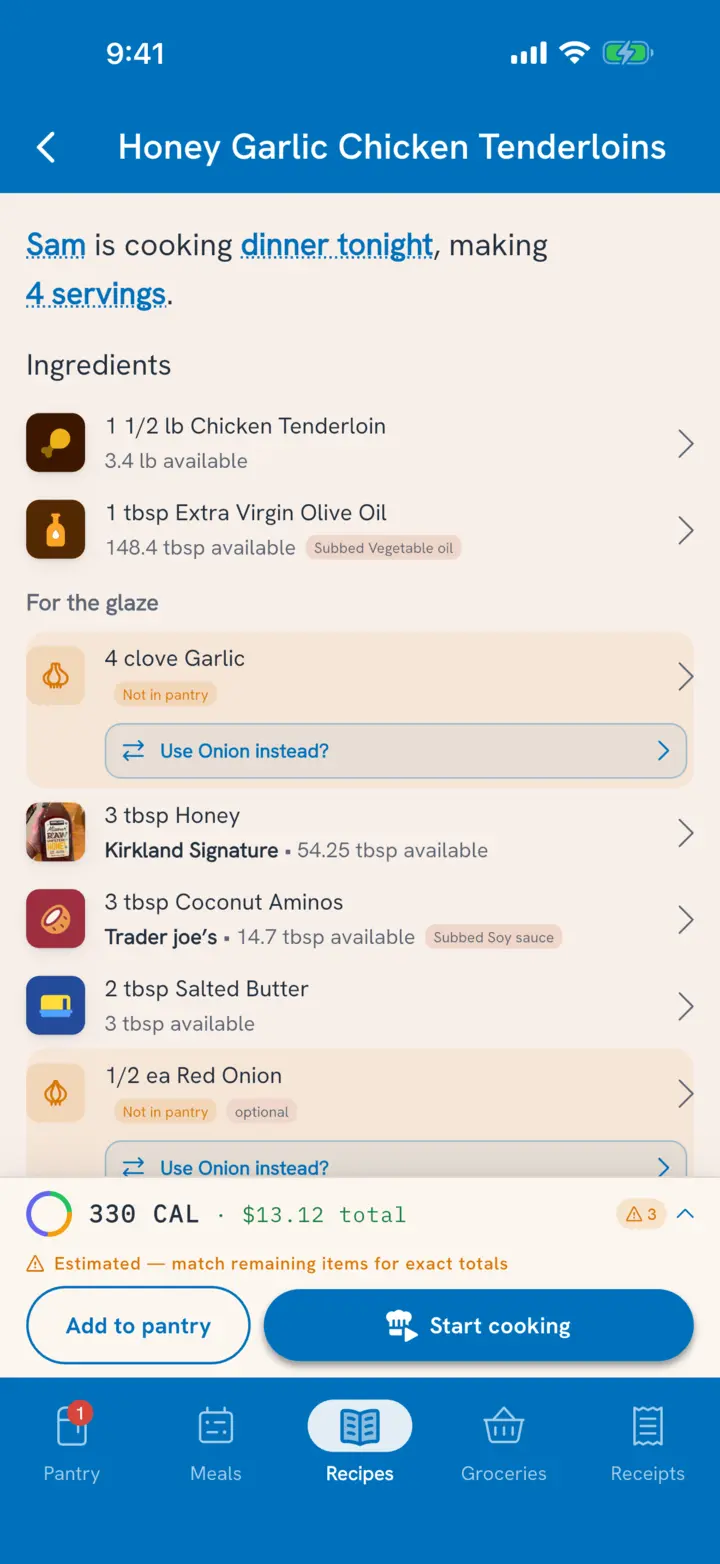
- Read the sentence at the top: "Sam is cooking dinner tonight, making 4 servings."
- Tap any underlined part to change it: who's cooking, which meal, or how much you're making.
Tuna matches each ingredient to your pantry before you get there. Any ingredient it couldn't settle is listed first, so you can see what's left to decide.
Make more or less
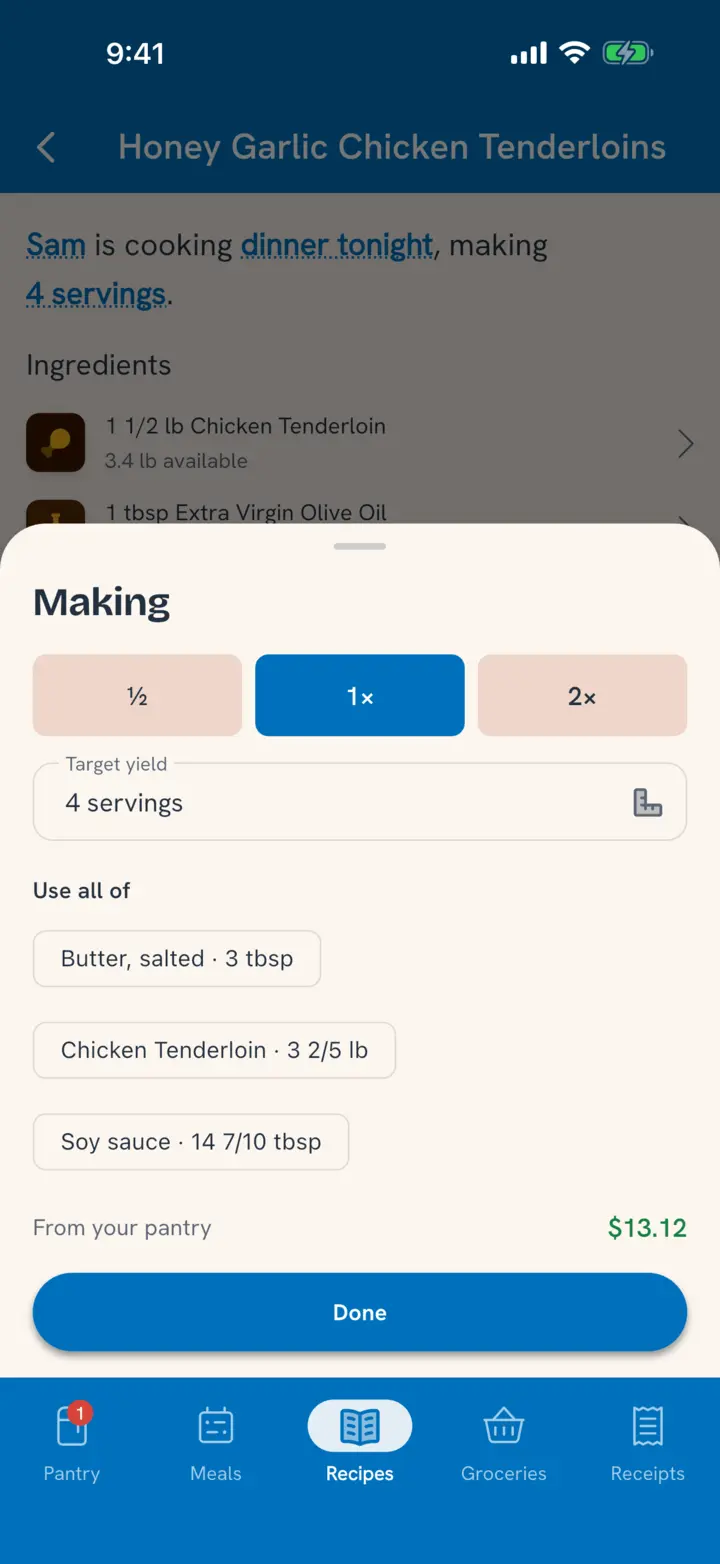
Tap the servings in the sentence to open Making:
- Tap ½, 1× or 2×, or type the amount you want in Target yield.
- Use all of lists what you have of each ingredient ("Frozen peas · 1 cup"). Tap one to size the batch around it, so the last of something gets used instead of left over.
- Anything you'd run short of shows as "short" with the amount, and the total cost From your pantry shows below.
Every ingredient scales with the batch, and so do the amounts written in the steps.
Pick what you're using
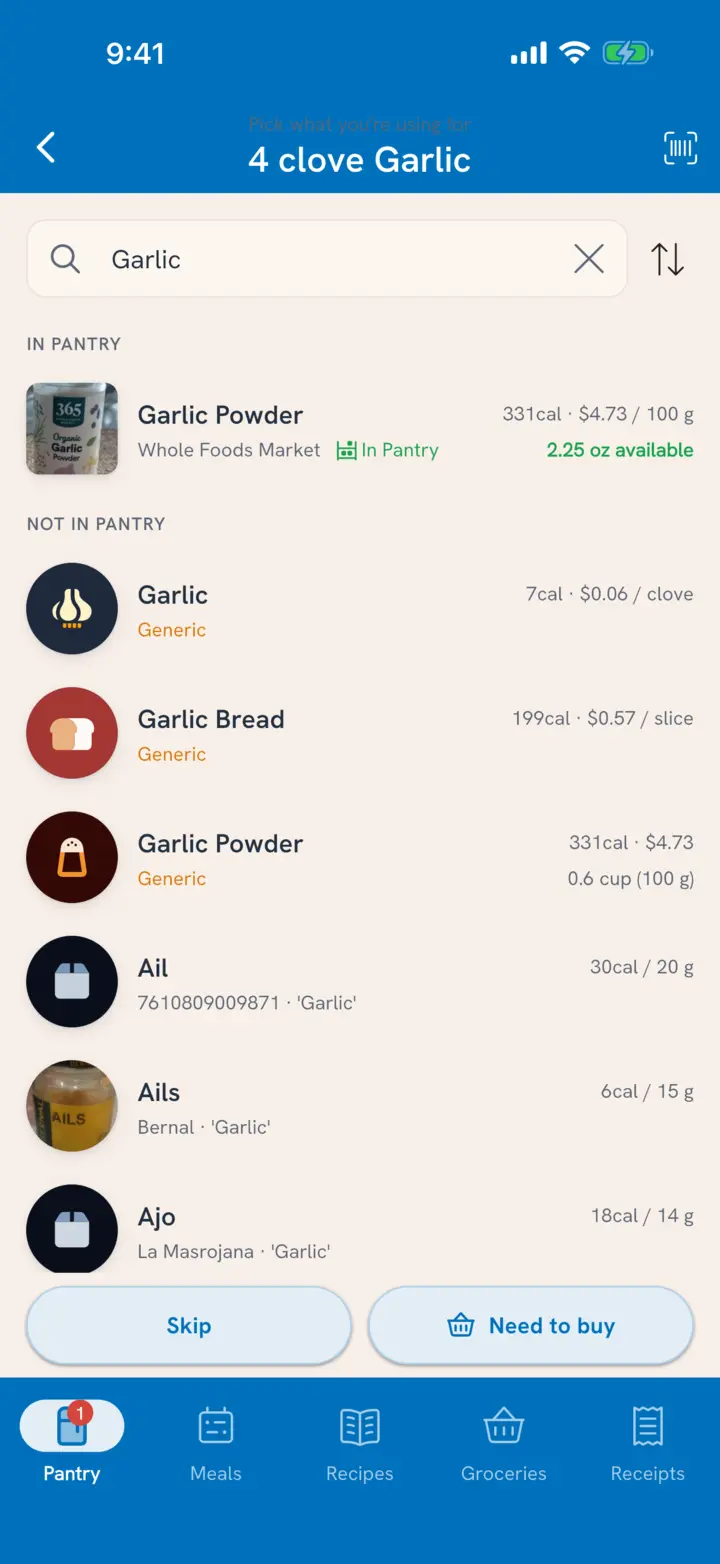
Tap an ingredient to choose what it comes from. The screen says what you're picking for ("Pick what you're using for 8 oz cremini mushrooms"), with search at the top and a scan button for anything you haven't added yet.
- Pick a pantry item to use it. If the recipe needs more than one package holds, Tuna uses the one that expires first, then the next.
- Pick something similar. Out of cremini but have button mushrooms? Pick those. It changes tonight's cook, not the recipe.
- Skip an ingredient you're leaving out tonight.
- No amount in the recipe? For a line like "oil for the waffle iron" or "salt to taste", a packaged food you pick starts at one serving from its label (1 tbsp of oil). Tap it to change the amount. For anything else, enter what you used.
- Need to buy something you don't have yet. The cook saves as a plan, and the button says so: Plan · 1 to buy. Once it's bought, open the cook and finish it.
Cook it now, later, or record it
The button at the bottom follows the meal in the sentence:
- Start cooking for a meal that's on now. Cook mode walks you through the recipe one step at a time, with timers. See Cook Step by Step.
- Plan for a meal later. Everything you picked is set aside so nobody else plans it, and Start cooking sits beside it when you're ready early.
- Add to pantry for a meal that's already over, when you're recording a dinner you already made.
What happens when you save
A cook ends with the dish in your pantry:
- The ingredients you used come out of the pantry.
- The dish goes in, with nutrition and cost built from what actually went in.
- It lands on the shelf the recipe keeps in (the fridge unless the recipe says otherwise), dated from the meal it was cooked for. See Keep Track of Leftovers.
- Tuna shows what you used: "Used 2 items expiring soon · $4.20 from your pantry".
Eating it is a separate step, whenever someone does. Plan a serving for someone's lunch, log it on the Meals tab, or say it to Talk to Tuna.
Related
- How does cook mode work? Cook Step by Step.
- Prepping rice or sauce for later? Mark the recipe as a prep recipe and the result lands in the pantry as an ingredient. See Write or Edit a Recipe.
- Where do the numbers go once you want them? See Your Nutrition Progress.