Say What You Have
Last updated
Some food never had a barcode, and some changes are faster to say than to tap. Say what changed in the kitchen the way you'd tell someone in the house: "Two pounds of chicken breast, a dozen eggs, and the leftover chili from Mom." Tuna splits it into items, matches each one to a food or to something already in your pantry, and shows you one list to check. Nothing is saved until you confirm it.
It works for food coming in and food going out. One sentence can add groceries, record what got eaten or tossed, fix an amount, and put something on the grocery list.
Which one is your situation?
- Loading what you have (the first afternoon, or a bag with no receipt): start from Scan Multiple Items. See Load what you have.
- Catching up on the day (what got finished, what went bad, what's left): start from Talk to Tuna on the Meals tab. See Catch up on what changed.
Both open the same voice sheet and end in the same list.
Load what you have
- Open the Pantry tab, tap +, and choose Scan Multiple Items.
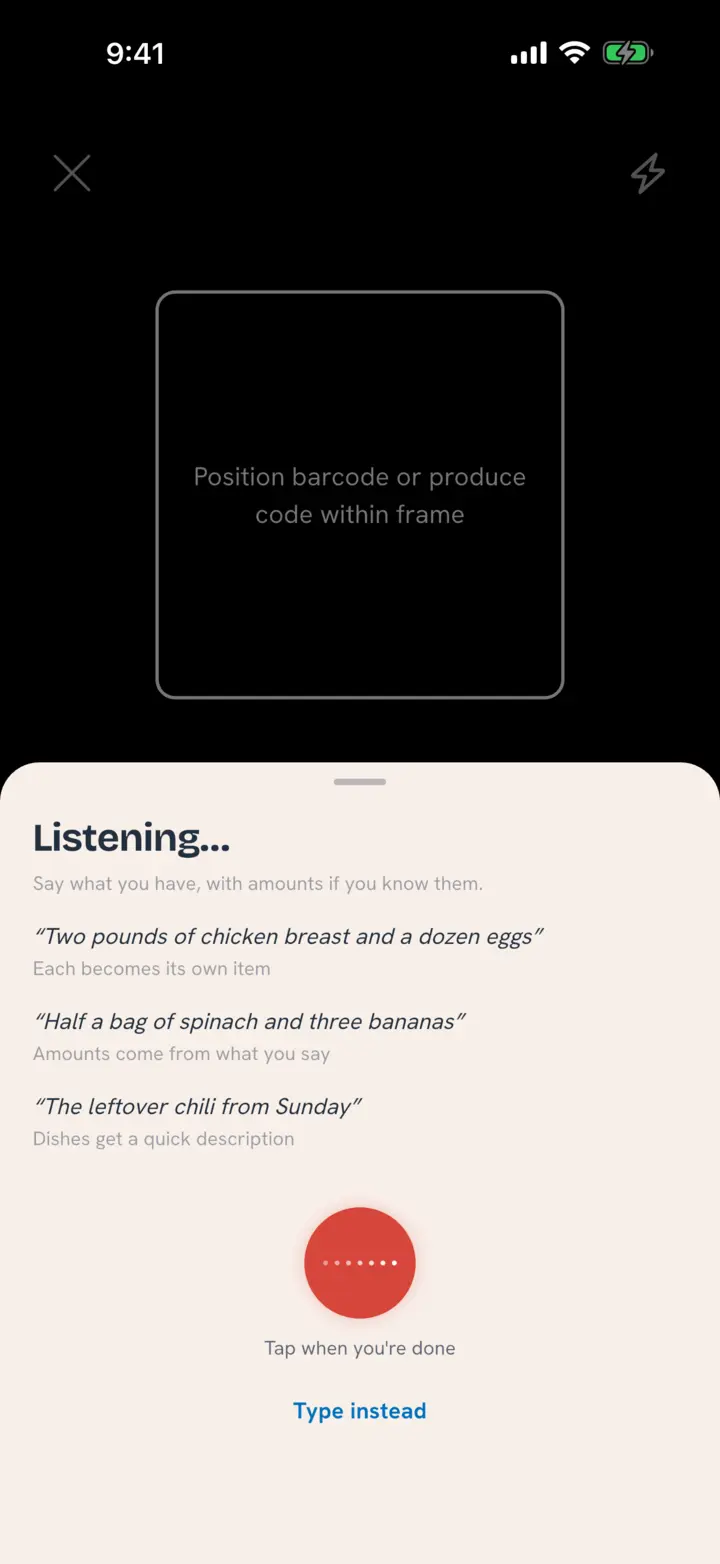
- Tap Say what you have in the panel at the bottom. The microphone opens right away.
- List what you have, with amounts if you know them. Tap when you're done.
- Check the list that opens (Is this right?) and tap Confirm.
What you confirm joins the list in Scan Multiple Items, next to anything you scanned. Keep scanning, say another batch, or tap Done.
Things you can say:
- "Two pounds of chicken breast and a dozen eggs." Each becomes its own item.
- "Half a bag of spinach and three bananas." Amounts come from what you say.
- "The leftover chili from Sunday." Dishes get a quick description.
Leave out an amount and Tuna uses a natural one for that food, like a bunch or a dozen, never a weight you'd have to check. Dates come from how long each food usually keeps, so the list doesn't ask about them. You can change either before you confirm.
Catch up on what changed
- Open the Meals tab and tap Talk to Tuna at the bottom of the screen.
- Say what changed. Tap when you're done.
- Check the list that opens (Is this right?) and tap Confirm.
Things you can say:
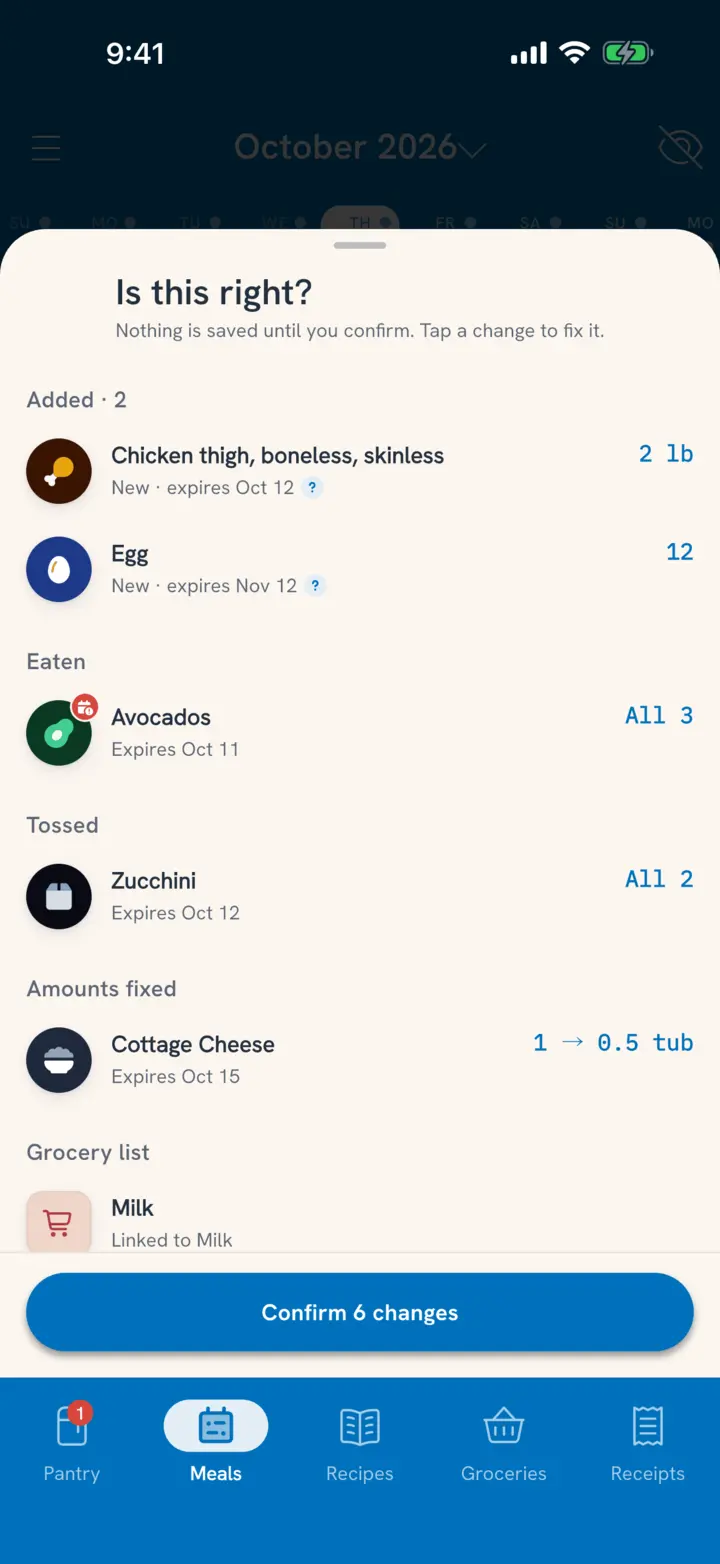
- "We finished the avocados, I tossed the zucchini, and there's about half the cottage cheese left." Records the avocados as eaten, the zucchini as tossed, and sets the cottage cheese to half.
- "Actually we have five plums." Fixes a count that was too low.
- "Put tortillas on the grocery list." Adds it to the shared list.
- "The kids had the chili for lunch." A named meal is logged as a meal, for the people you said.
"Finished" and "the rest" mean all of it. "About half" means half of what Tuna shows. When your household has more than one of something, Tuna picks the oldest one first, and you can switch.
Check the list
Is this right? groups everything by what will happen: Meals, Cooked, Added, Eaten, Tossed, Amounts fixed, Grocery list, Needs details and Not in your pantry. Each row shows the food and the change, like "All 3" or "2 → 5".
- Tap a row to change it: a different food (Not this?), a different pantry item (Which one?), the amount, or the date.
- Swipe a row left to skip it. Swipe again to Put back.
- Tap Confirm to save the rest. A message says how many changes were saved.
Everything goes through the same steps as tapping it in the app. An eaten item counts the same as marking it All gone and choosing Eaten, and a tossed one counts as waste.
Rows that need you
Two kinds of rows can't be saved as they are:
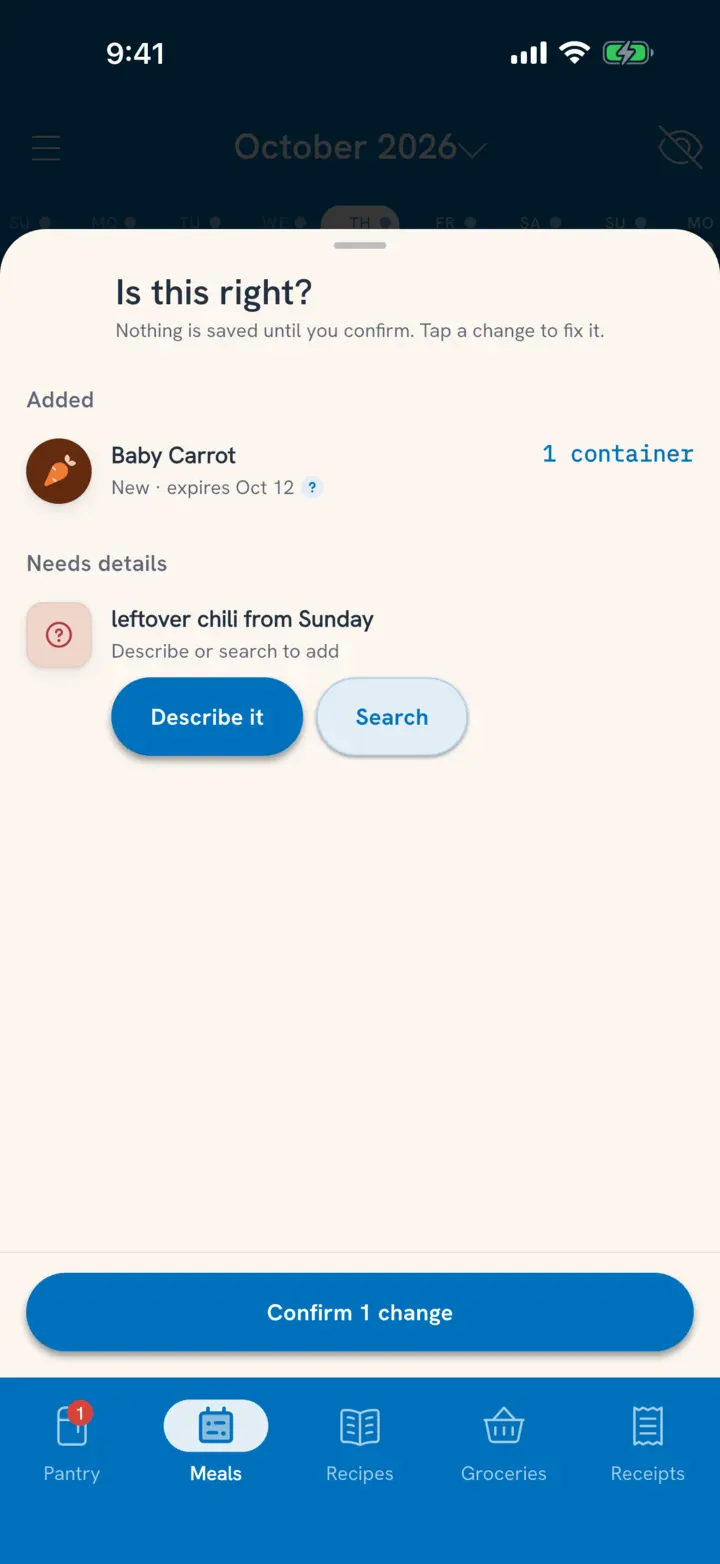
- Needs details (shown as Describe or search to add): Tuna couldn't match it to a food with confidence, or it's a dish. Tap Describe it for leftovers and dishes, or Search to find the food yourself. Tuna never guesses a food for you.
- Not in your pantry: you said something was finished, but there's no pantry item for it. The row says so, so nothing gets dropped without you seeing it, and it doesn't change anything.
Speak or type
You don't have to talk. Tap Type instead on the voice sheet and write the same sentence. It works the same way.
Tuna never talks back. Replies show as text on the sheet, so it works in a quiet house too.
Related
- What else can I say? Track Meals and Pantry Changes by Voice.
- Scanning too? Load Your Pantry in One Go.
- Want the same thing in your AI chat app? See all the ways to chat with your pantry.
- How do I add a dish that isn't in the catalog? Add Food That Isn't in the Catalog.