Add Food That Isn't in the Catalog
Last updated
Some of the food most likely to go to waste has no barcode and no catalog entry: the baked ziti a friend dropped off, the tray from the party, the half pizza in the box. Describe it in a few words and Tuna estimates it, so it lands in the pantry with a date and gets the same morning alert as everything else.
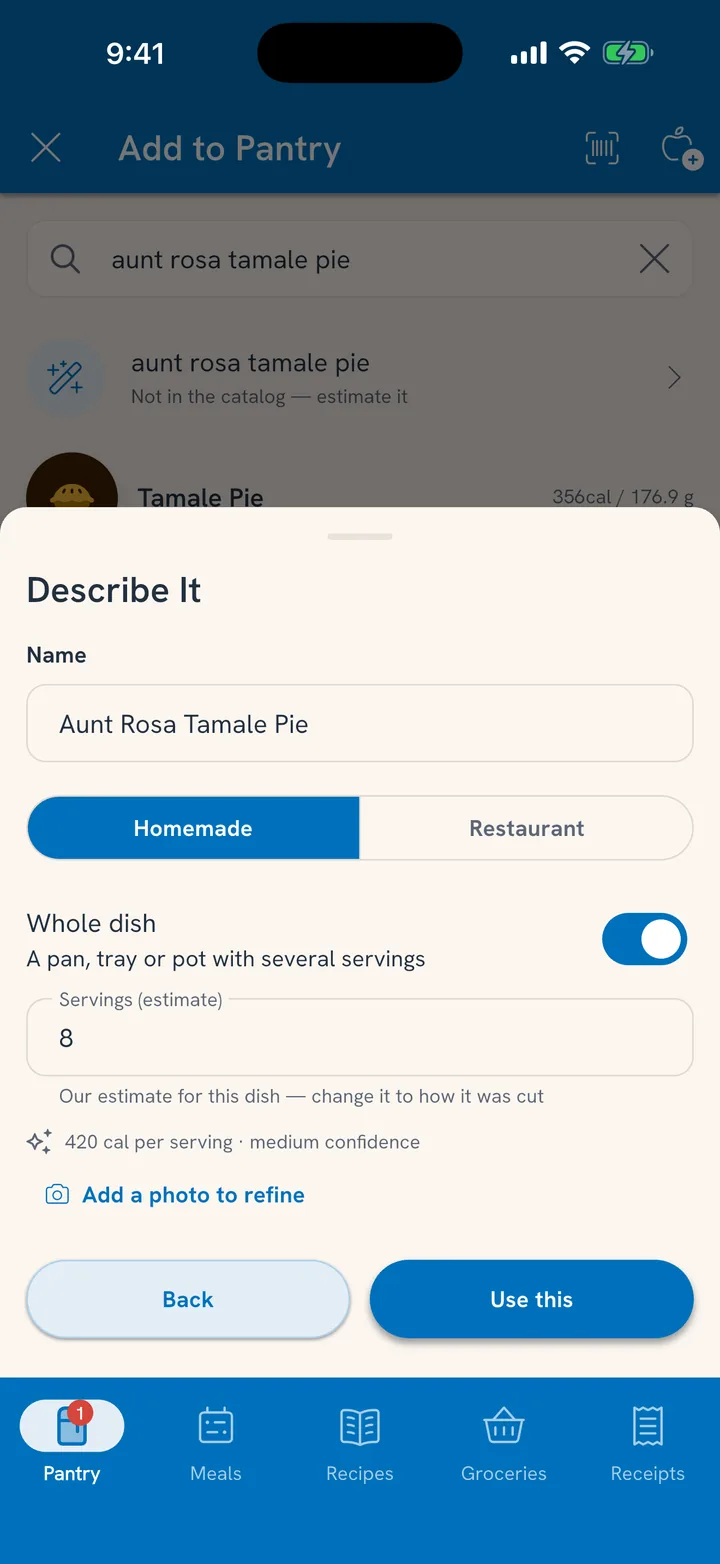
Describe it
- Open the Pantry tab, tap +, and choose Search.
- Type what it is, like "baked ziti with sausage."
- If the catalog has nothing that fits, the first row reads Not in the catalog. Otherwise it's at the bottom: Or estimate it. Tap it.
- Under What is it?, keep it to a few words. Add a photo if you have one; it helps.
- If you know roughly how much is there ("about 3 lb"), add it. Tuna works out how many servings that is.
- Tap Estimate.
Check what Tuna came up with
After estimating, Tuna shows a name you can edit and a one-line summary.
- Choose Homemade or Restaurant.
- Turn on Whole dish for a pan, tray or pot with several servings, and set how many.
- Tap Use this to add it to the pantry.
It goes in under Leftovers with a date a week out, so you'll hear about it before it goes bad. Change the date if you know better.
When it's eaten
A whole dish works like any other item: plan servings for meals, or mark it All gone when it's finished and say whether any of it got tossed. See Mark Food All Gone.
Related
- Leftovers from your own cooking come in on their own. See Keep Track of Leftovers.
- Everything with a barcode: Load Your Pantry in One Go.